
🚨 CRITICAL (CVSS 9.8/10) Status: Active Exploitation Confirmed
Two critical vulnerabilities affecting widely used Fortinet products are currently being exploited in the wild. These flaws allow unauthenticated, remote attackers to bypass security controls and seize full administrative control of devices.
1. The Vulnerabilities Explained
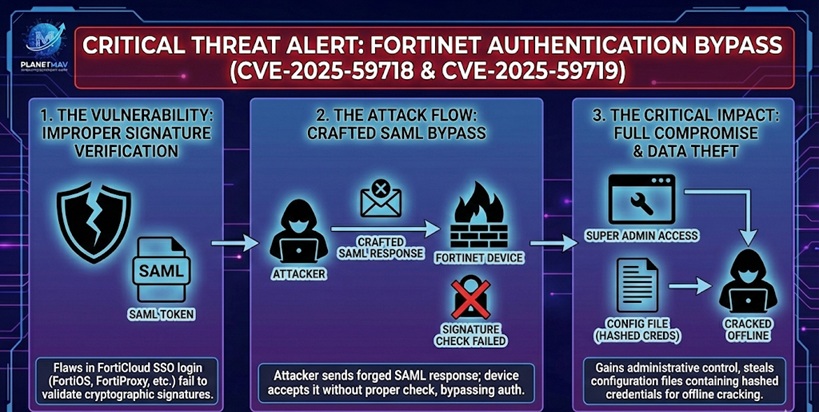
Both CVE-2025-59718 and CVE-2025-59719 are caused by an improper verification of cryptographic signatures within the FortiCloud Single Sign-On (SSO) authentication process.
- The Flaw: The system fails to correctly validate the cryptographic signature of SAML (Security Assertion Markup Language) response messages.
- The Attack Vector: An attacker can forge a malicious SAML response message that mimics a legitimate login token. Because the device does not properly verify the signature, it accepts the forged token as valid.
- The Result: The attacker logs in as a “Super Admin” without ever needing a valid username or password, completely bypassing authentication.
2. Active Exploitation & Configuration Theft
Security researchers (including Arctic Wolf Labs) have confirmed that threat actors began actively exploiting these bugs as of December 12, 2025. The attack chain typically follows these steps:
- Bypass: The attacker sends a crafted SAML packet to the target device’s management interface.
- Intrusion: The device grants administrative access, logging the attacker in via the FortiCloud SSO mechanism.
- Data Theft: Once inside, attackers are observed exporting the device configuration file via the GUI.
- Credential Harvesting: These configuration files contain hashed user credentials. Attackers extract these hashes and crack them offline to gain persistent access to the network, even if the device is later patched.
3. Affected Products & Versions
The vulnerabilities affect the following products if the FortiCloud SSO feature is enabled (note: this feature is often enabled by default when a device is registered to FortiCare):
| Product | Affected Versions |
| FortiOS | 7.0.0 – 7.0.17 7.2.0 – 7.2.11 7.4.0 – 7.4.8 7.6.0 – 7.6.3 |
| FortiProxy | 7.0.0 – 7.0.21 7.2.0 – 7.2.14 7.4.0 – 7.4.10 7.6.0 – 7.6.3 |
| FortiWeb | 7.4.0 – 7.4.9 7.6.0 – 7.6.4 8.0.0 |
| FortiSwitchManager | 7.0.0 – 7.0.5 7.2.0 – 7.2.6 |
Post-Compromise Check: If you find indicators of compromise (such as unexpected logins from unknown IPs), you must assume your configuration file was stolen. Reset all local and administrative passwords immediately, as the old hashes are likely compromised.
Comments are closed